| Device Type: |
ECTACO B-3 |
| Operating system: |
eBM OS 2.0 |
| Language pairs: | English <-> Spanish; Spanish <-> English |
| Size: |
5.17x3.39x0.67 in |
| Weight: |
6.5 oz |
| Battery Type: |
2 x AAA batteries, included |
| PC connection |
Yes |
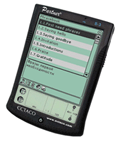
This new bilingual English <-> Spanish dictionary offers instant translation in both directions. With its powerful search functions, it is able to locate the word you are looking for in split-seconds. Capable of pronouncing both English and Spanish entries, it saves you time and effort and makes communicating in either language nearly effortless. Perfect for both native English speakers learning Spanish and Spanish speakers learning English, it includes Vector Ultima spell checker, a user's dictionary, English and Spanish idioms and English irregular verbs to help you attain proficiency in whichever language you choose. It also includes word games and exercises to make your learning experience both fun and effective.
Linguistic features
- Spanish Grammar Book
- Spanish verbs
- Spanish voice
- Phrasebook
Additional Device features
- Display: 16-level grayscale display and high-resolution touch screen with enhanced polarizers;
- Hardware features: USB port ∙ MultiMedia Card (MMC) slot ∙ Headphone jack ∙ Speaker ∙ Microphone ∙ Backlight;
- Two input methods: keyboard and handwriting recognition
- Accessories: Stylus ∙ Removable lid ∙ Headphones ∙ USB Cable (USB and Serial Cradle sold separately) with ECTACO Desktop Manager (downloadable for free);
- Memory: 8 MB SDRAM ∙ MMC slot for expandable memory and MultiMedia Card included;
- PC system requirements: IBM-compatible 486 PC or higher ∙ 256 color VGA monitor ∙ Mouse or other pointing device ∙ Windows NT 4.0, Windows 98, Windows 2000 and Windows XP∙ 50 MB free disk space ∙ 32 MB RAM (recommended) ∙ available serial or standard USB port ∙ Internet connectivity ∙ Microsoft Internet Explorer 4.0 (or later) OR Netscape Navigator 4.02 (or later);
- Password protection
- Core applications: Music Player ∙ Date Book with audio reminders∙ Address Book ∙ Voice Memo ∙ Memo Book ∙ To Do Book ∙ Calculator
This model is normally operated in a silent mode and you will need to press the "Speaker" button or to choose the corresponding option from the menu in order to hear the translation spoken out loud.
Click here to learn about devices featuring multiple languages

















 For help, please contact us filling out













 Turbo search





